we looking at how HTML is used to creat a web pages, and how structured th web page, and how to use element and tags.
CSS :
we used css to stylng and layout the HTML pages , like fonts color , add background , font style …etc.
all this to make pages more attractive.
PRACTICAL :
We look at some new tags that will be introduced in HTML5 to help describe the structure of your pages. HTML5 is the latest version of HTML (still under development at the time of writing). Before learning about these elements, you need a good grasp of how CSS is used to control the design of web pages. There is a chapter that talks you through a design process that you might like to follow when creating a new website.
How People Access the Web :
Browsers:
is application software for accessing the World Wide Web. When a user requests a web page from a particular website, the web browser retrieves the necessary content from a web server and then displays the page on the user’s device.
Web Servers:
Web servers are special computers that are constantly connected to the Internet, and are optimized to send web pages out to people who request them.
Screen readers:
are programs that read out the contents of a computer screen to a user. They are commonly used by people with visual impairments.
Devices:
People are accessing websites on an increasing range of devices including desktop computers, laptops, tablets, and mobile phones. It is important to remember that various devices have different screen sizes and some have faster connections to the web than others.
How Websites Are Created ?
The website is an component of multple files like , HTML file ,CSS file ,JAVASCRIPT file and more , this files present on web browser like Chrome or FireFox … , to display a contant of this files , to show an elements to user and interactive with them .
How the Web Works?
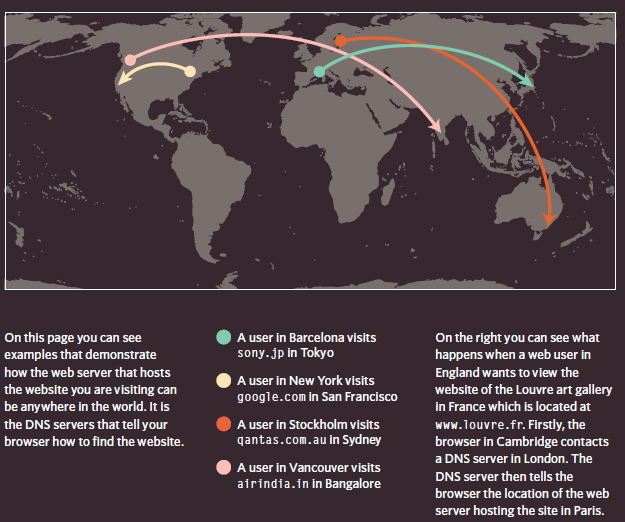
When you visit a website, the web server hosting that site could be anywhere in the world. In order for you to find the location of the web server, your browser will first connect to a Domain Name System (DNS) server.
How Pages Use Structure ?
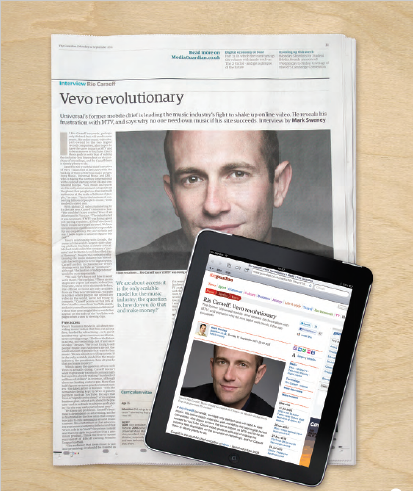
its like a newspaper , it have a hedline , some text and some images ,but in web pages you can also add images and vidoes , and make some animations in contants .
Structuring Word Documents
what you can do in a text editor like WORD , you can do in a web page , by use hedings and some font specification like Boold or italic …etc
HTML Describes the Structure of Pages
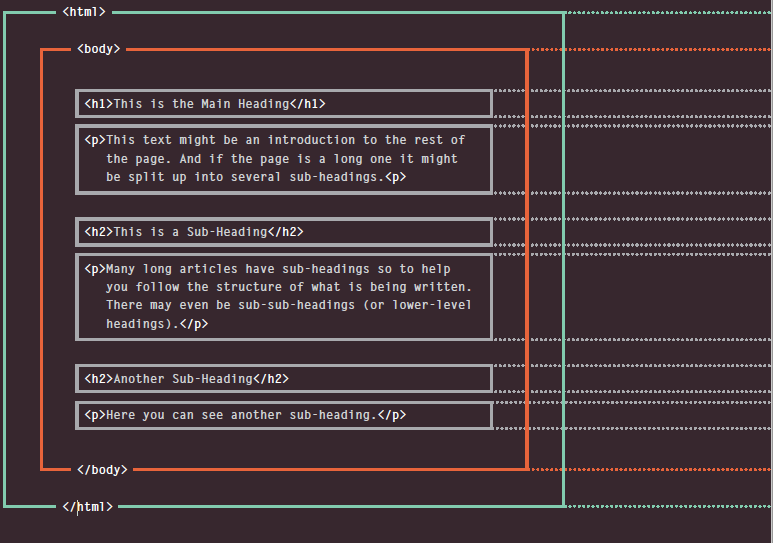
<html>
<body>
<h1>This is the Main Heading</h1>
<p>This text might be an introduction to the rest of
the page. And if the page is a long one it might
be split up into several sub-headings.<p>
<h2>This is a Sub-Heading</h2>
<p>Many long articles have sub-headings so to help
you follow the structure of what is being written.
There may even be sub-sub-headings (or lower-level
headings).</p>
<h2>Another Sub-Heading</h2>
<p>Here you can see another sub-heading.</p>
</body>
</html>
this code above , is describe the structure of html page .
the tag : is any word in angled brackets , between open tag <> and closing tag </>
Attributes Tell Us More About Elements:
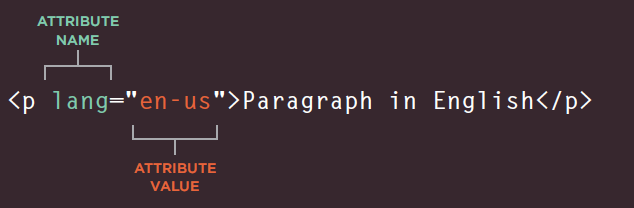
Attributes provide additional information about the contents of an element. They appear on the opening tag of the element and are made up of two parts: a name and a value, separated by an equals sign.
Body, Head & Title
<body>
Everything inside this element is shown inside the main browser window.
<head>
this element contain information about the page , and tis information well not displayed in a browser window.
****
this element show the name of page or sometimes another information in the tab for that page .
Creating a Web Page on a PC :
open any text editor.
write some html code.
save the file with .html extintion .
open the file uses web browser.
Looking at How Other sites are Built :
when you looking at Other website , you may take an idea to start build your web site .
EXTRA MARKUP
different versions of HTML:
HTML4
HTML5
a few elements added in HTML5
web page authors do not need to close all tags, and new elements and attributes will be introduced
had some presentational elements to control the appearance of pages
ensure that users with older browsers will be able to view your pages
There are many HTML elements which have been modified or removed from HTML5. Some of them are listed below:
<!-- start of introduction -->
<h1>Current Exhibitions</h1>
<h2>Olafur Eliasson</h2>
<!-- end of introduction -->
<!-- start of main text -->
<p>Olafur Eliasson was born in Copenhagen, Denmark
in 1967 to Icelandic parents.</p>
<p>He is known for sculptures and large-scale
installation art employing elemental materials
such as light, water, and air temperature to
enhance the viewer's experience.</p>
<!-- end of main text -->
<!--
<a href="mailto:info@example.org">Contact</a>
-->
anything between the comments tag well not shown in html page.
we use comment to make the code familiar you are with the page at the time of writing it, when you come back to it later (or if someone else needs to look at the code).
ID Attribute:
<p>Water and air. So very commonplace are these
substances, they hardly attract attention - and
yet they vouchsafe our very existence.</p>
<p id="pullquote">Every time I view the sea I feel
a calming sense of security, as if visiting my
ancestral home; I embark on a voyage of seeing.
</p>
<p>Mystery of mysteries, water and air are right
there before us in the sea.</p>
Every HTML element can carry the id attribute. It is used to uniquely identify that element from other elements on the page. Its value should start with a letter or an underscore (not a number or any other character). It is important that no two elements on the same page have the same value for their id attributes (otherwise the value is no longer unique).
Class Attribute :
<p class="important">For a one-year period from
November 2010, the Marugame Genichiro-Inokuma
Museum of Contemporary Art (MIMOCA) will host a
cycle of four Hiroshi Sugimoto exhibitions.</p>
<p>Each will showcase works by the artist
thematically contextualized under the headings
"Science," "Architecture," "History" and
"Religion" so as to present a comprehensive
panorama of the artist's oeuvre.</p>
<p class="important admittance">Hours: 10:00 – 18:00
(No admittance after 17:30)</p>
Every HTML element can also carry a class attribute. Sometimes, rather than uniquely identifying one element within a document, you will want a way to identify several elements as being different from the other elements on the page. For example, you might have some paragraphs of text that contain information that is more important than others and want to distinguish these elements, or you might want to differentiate between links that point to other pages on your own site and links that point to external sites.
Block Elements:
<h1>Hiroshi Sugimoto</h1>
<p>The dates for the ORIGIN OF ART exhibition are as
follows:</p>
<ul>
<li>Science: 21 Nov - 20 Feb 2010/11</li>
<li>Architecture: 6 Mar - 15 May 2011</li>
<li>History: 29 May - 21 Aug 2011</li>
<li>Religion: 28 Aug - 6 Nov 2011</li>
</ul>
Inline Elements :
Timed to a single revolution of the planet around
the sun at a 23.4 degrees tilt that plays out the
rhythm of the seasons, this <em>Origins of Art</em>
cycle is organized around four themes: <b>science,
architecture, history</b> and <b>religion</b>.
Grouping Text & Elements In a Block
<div>
The <div> element allows you to group a set of elements together in one block-level box.
The element acts like an inline equivalent of the <div> element. It is used to either:
Contain a section of text where there is no other suitable element to differentiate it from its surrounding text
Contain a number of inline elements
<p>Anish Kapoor won the Turner Prize in 1991 and
exhibited at the <span class="gallery">Tate
Modern</span> gallery in London in 2003.</p>
IFrames
<iframe>
An iframe is like a little window that has been cut into your page — and in that window you can see another page. The term
iframe is an abbreviation of inline frame.
**src **
The src attribute specifies the URL of the page to show in the frame.
height
The height attribute specifies the height of the iframe in pixels.
width
The width attribute specifies the width of the iframe in pixels.
scrolling
The scrolling attribute will not be supported in HTML5. In HTML 4 and XHTML, it indicates whether the iframe should have scrollbars or not.
frameborder
The frameborder attribute will not be supported in HTML5. In HTML 4 and XHTML, it indicates whether the frame should have a border or not.
seamless
In HTML5, a new attribute called seamless can be appliedto an iframe where scrollbars
are not desired. The seamless attribute (like some other new HTML5 attributes) does not need a value, but you will often see authors give it a value of seamless. Older browsers do not support the seamless attribute.
Information About Your Pages
The element lives inside the <head> element and contains information about that web page.
meta attributes:
description
keywords
robots
author
pragma
expires
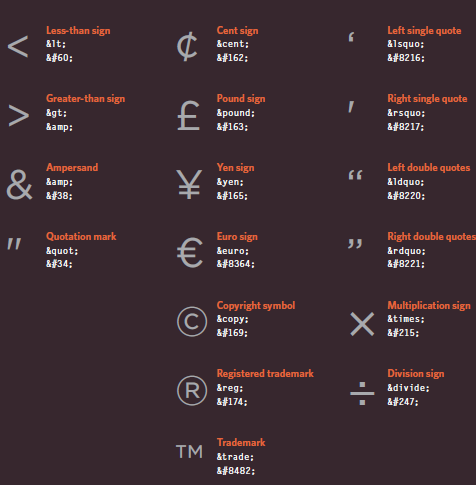
Escape Characters:
There are some characters that are used in and reserved by HTML code. (For example, the left and right angled brackets.)
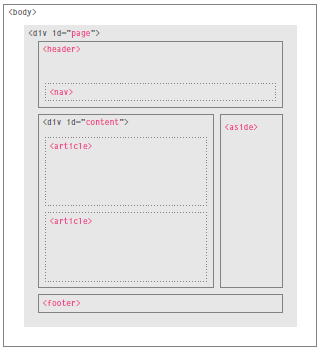
Html 5 Layout Elements
Headers & Footers
<header> <footer>
in the header you must write the main title or text that describe your page .
in the footer maby contain a copyright or the social media links , or contact information.
Navigation
<nav>
The <nav> element is used to contain the major navigational blocks on the site such as the primary site navigation.
The <article> element acts as a container for any section of a page that could stand alone and potentially be syndicated.
<article>
<figure>
<img src="images/bok-choi.jpg" alt="Bok Choi" />
<figcaption>Bok Choi</figcaption>
</figure>
<hgroup>
<h2>Japanese Vegetarian</h2>
<h3>Five week course in London</h3>
</hgroup>
<p>A five week introduction to traditional
Japanese vegetarian meals, teaching you a
selection of rice and noodle dishes.</p>
</article>
<article>
<figure>
<img src="images/teriyaki.jpg"
alt="Teriyaki sauce" />
<figcaption>Teriyaki Sauce</figcaption>
</figure>
<hgroup>
<h2>Sauces Masterclass</h2>
<h3>One day workshop</h3>
</hgroup>
<p>An intensive one-day course looking at how to
create the most delicious sauces for use in a
range of Japanese cookery.</p>
</article>
Aside
<aside>
The <aside> element has two purposes, depending on whether it is inside an <article> element or not.
The purpose of the <hgroup> element is to group together a set of one or more <h1> through <h6> elements so that they are treated as one single heading.
<hgroup>
<h2>Japanese Vegetarian</h2>
<h3>Five week course in London</h3>
</hgroup>
<div class="wrapper">
<header>
<h1>Yoko's Kitchen</h1>
<nav>
<!-- nav content here -->
</nav>
</header>
<section class="courses">
<!-- section content here -->
</section>
<aside>
<!-- aside content here -->
</aside>
<footer>
<!-- footer content here -->
</footer>
</div><!-- .wrapper -->
Ok , now let ask our self , when we want to build a website , who is the site for?
you must have a target something, and this some Target Audience: individuals
What is the age range of your target audience?
●● Will your site appeal to more women or men? What is the mix?
●● Which country do your visitors live in?
●● Do they live in urban or rural areas?
●● What is the average income of visitors?
●● What level of education do they have?
●● What is their marital or family status?
●● What is their occupation?
●● How many hours do they work per week?
●● How often do they use the web?
●● What kind of device do they use to access the web?
Target Audience: Companies
●● What is the size of the company or relevant department?
●● What is the position of people in the company who visit your site?
●● Will visitors be using the site for themselves or for someone else?
●● How large is the budget they control?
this question above help you to build your website and make it usefull for those people visit your website , and must you know what your website provid the services .
you must be know what your target from this website , like just to provide some service or to make a business !!
What Your Visitors are Trying to Achieve ?
It is unlikely that you will be able to list every reason why someone visits your site but you are looking for key tasks and motivations. This information can help guide your site designs.
What Information Your Visitors Need ?
You know who is coming to your site and why they are coming, so now you need to work out what information they need in order to achieve their goals quickly and effectively.
How Of ten People Will Visit Your Site?
Some sites benefit from being updated more frequently than others. Some information (such as news) may be constantly changing, while other content remains relatively static.
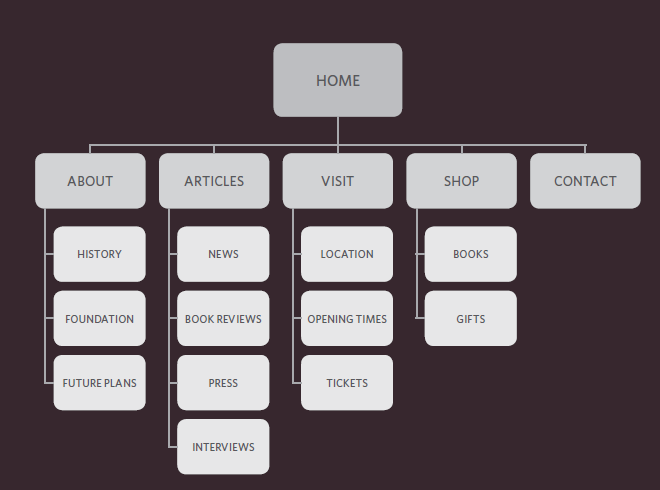
Site Maps
is a file where you provide information about the pages, videos, and other files on your site, and the relationships between them. Search engines like Google read this file to more intelligently crawl your site. A sitemap tells Google which pages and files you think are important in your site, and also provides valuable information about these files: for example, for pages, when the page was last updated, how often the page is changed, and any alternate language versions of a page.
WireFrames
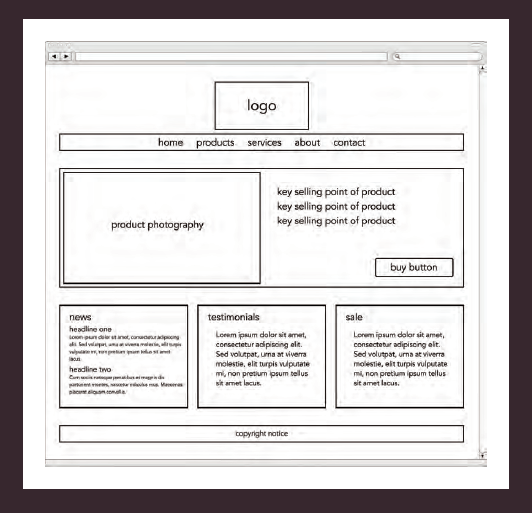
A wireframe is a simple sketch of the key information that needs to go on each page of a site. It shows the hierarchy of the information and how much space it might require.
You can use grouping and similarity to help simplify the information you present.
The ABC of Programming :
A script is a series of instructions that a computer can follow to achieve a goal.
WRITING A SCRIPT
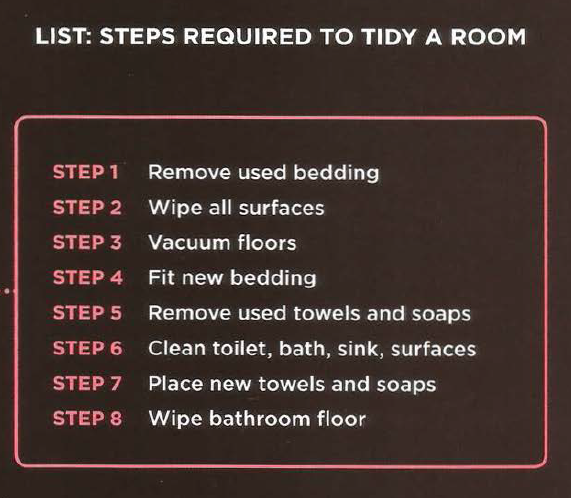
To write a script, you need to first state your goal and then list the tasks that need to be completed in order to achieve it.
Start with the big picture of what you want to achieve, and break that down into smaller steps.
DEFINE THE GOAL
DESIGN THE SCRIPT
CODE EACH STEP
you need to get to grips with the:
• Vocabulary: The words that computers understand
• Syntax: How you put those words together to create instructions computers can follow.
You need to learn to “think” like a computer because they solve tasks in different ways than you or I might approach them.
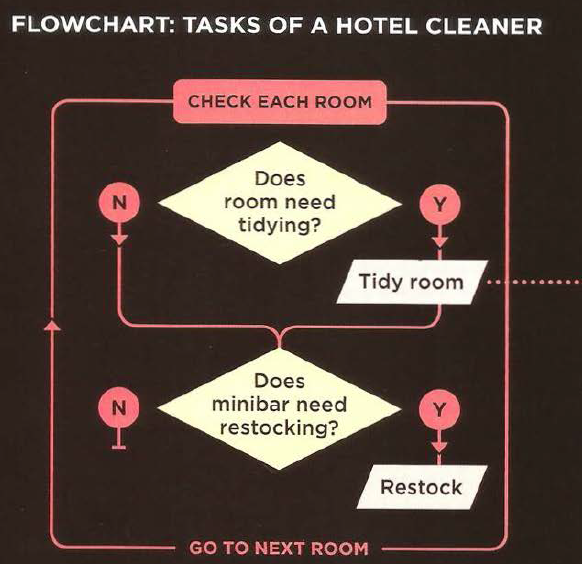
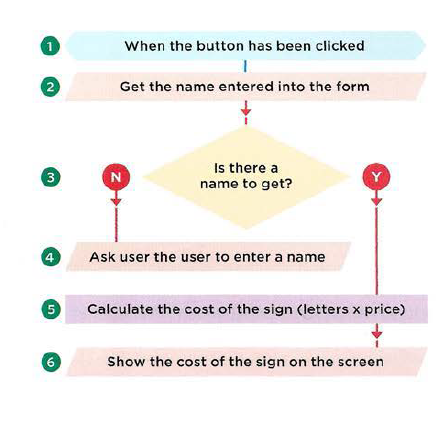
SKETCHING OUT THE TASKS IN A FLOWCHART:
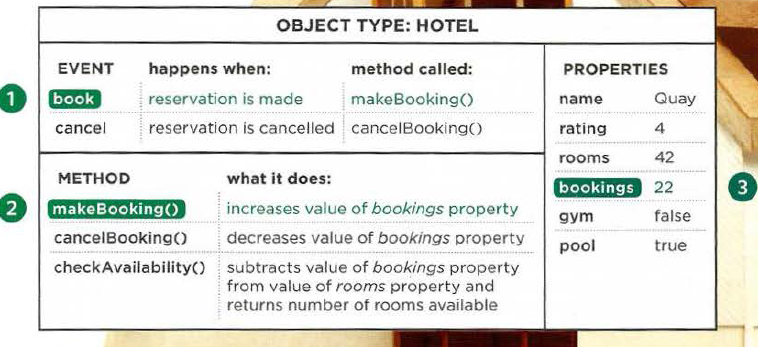
OBJECTS & PROPERTIES:
OBJECTS
In computer programming, each physica l thing in the world can be represented as an object. There are two different types of objects here: a hotel and a car.
PROPERTIES (CHARACTERISTICS)
Both of the cars share common characteristics. In fact, all cars have a make, a color, and engine size. You could even determine their current speed. Programmers call these characteristics the properties of an object.
EVENTS
There are common ways in which people interact with each type of object. For example, in a car adriver will typically use at least two pedals. The car has been designed to respond differently when the driver interacts with each of the different pedals:
• The accelerator makes the car go faster
• The brake slows it down.
Programmers choose which events they respond to. When a specific event happens, that event can be used to trigger a specific section of the code.
METHODS
Methods typically represent how people (or other things) interact with an object in the real world.
The code for a method can contain lots of instructions that together represent one task.
PUTTING IT ALL TOGETHER
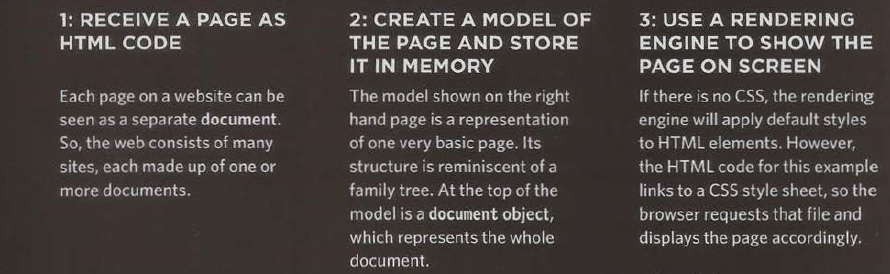
HOW A BROWSER SEES A WEB PAGE
To write a script for a web page , do :
open text editor.
write a script code .
save file as .js extintion .
open HTML file.
in the head tag , write a link tag , and in the src attribute , write the path of the script file.
 the tag : is any word in angled brackets , between open tag <> and closing tag </>