HTML
Tables
A table is a structured set of data made up of rows and columns (tabular data). A table allows you to quickly and easily look up values that indicate some kind of connection between different types of data, for example a person and their age, or a day of the week, or the timetable for a local swimming pool.
HTML table tag is used to display data in tabular form (row * column). There can be many columns in a row.
We can create a table to display data in tabular form, using < table> element, with the help of < tr> , < td>, and <th> elements.
In Each table, table row is defined by < tr> tag, table header is defined by < th>, and table data is defined by < td> tags.
HTML tables are used to manage the layout of the page e.g. header section, navigation bar, body content, footer section etc. But it is recommended to use div tag over table to manage the layout of the page

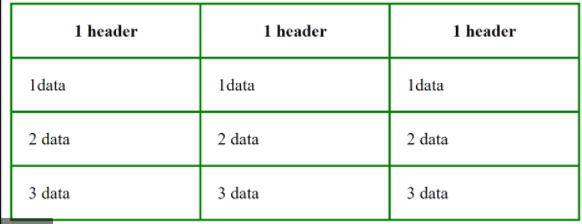
LONG TABLES
There are three elements that help distinguish between the main content of the table and the first and tast rows (which can contain different content).
< thead> The headings of the table should sit inside the Cthead> element. < tbody> The body should sit inside the < tbody> elemen < tfoot> The footer belongs inside the < tfoot> element.
JS Functions, Methods, and Objects
Properties are the most important part of any JavaScript object.
JavaScript Properties
Properties are the values associated with a JavaScript object.
A JavaScript object is a collection of unordered properties.
Properties can usually be changed, added, and deleted, but some are read only.
1. Accessing JavaScript Properties
The syntax for accessing the property of an object is:
objectName.property // person.age or

objectName[” property”] // person[” age”] or

objectName[ expression] // x = “age”; person[ x]
2. JavaScript for…in Loop
The JavaScript for…in statement loops through the properties of an object.
Syntax :
for (variable in object) { // code to be executed } The block of code inside of the for…in loop will be executed once for each property
3. Adding New Properties
You can add new properties to an existing object by simply giving it a value.
Assume that the person object already exists - you can then give it new properties:
Example : person.nationality = “English”;
4. Deleting Properties
The delete keyword deletes a property from an object:
Example :
let person = {firstName:”John”, lastName:”Doe”, age:50, eyeColor:”blue”}; delete person.age; // or delete person[” age”];
5. Property Attributes
All properties have a name. In addition they also have a value.
The value is one of the property’s attributes.
Other attributes are: enumerable, configurable, and writable.
These attributes define how the property can be accessed (is it readable?, is it writable?)
In JavaScript, all attributes can be read, but only the value attribute can be changed (and only if the property is writable).
JavaScript Object Methods
The this Keyword
In a function definition, this refers to the “owner” of the function.
In other words, this.firstName means the firstName property of this object.
JavaScript Methods JavaScript methods are actions that can be performed on objects.
A JavaScript method is a property containing a function definition.
Property : Value fullName function() {return this.firstName + “ “ + this.lastName;}
Accessing Object Methods
You access an object method with the following syntax:
objectName.methodName()
You will typically describe fullName() as a method of the person object, and fullName as a property.
The fullName property will execute (as a function) when it is invoked with ().