Application State with Redux
Redux is a predictable state container for JavaScript apps.
Redux is an open-source JavaScript library for managing and centralizing application state.
It helps you write applications that behave consistently, run in different environments (client, server, and native), and are easy to test. On top of that, it provides a great developer experience, such as live code editing combined with a time traveling debugger.
You can use Redux together with React, or with any other view library. It is tiny (2kB, including dependencies), but has a large ecosystem of addons available.
Redux Toolkit is our official recommended approach for writing Redux logic. It wraps around the Redux core, and contains packages and functions that we think are essential for building a Redux app. Redux Toolkit builds in our suggested best practices, simplifies most Redux tasks, prevents common mistakes, and makes it easier to write Redux applications.
RTK includes utilities that help simplify many common use cases, including store setup, creating reducers and writing immutable update logic, and even creating entire “slices” of state at once.
Whether you’re a brand new Redux user setting up your first project, or an experienced user who wants to simplify an existing application, Redux Toolkit can help you make your Redux code better.
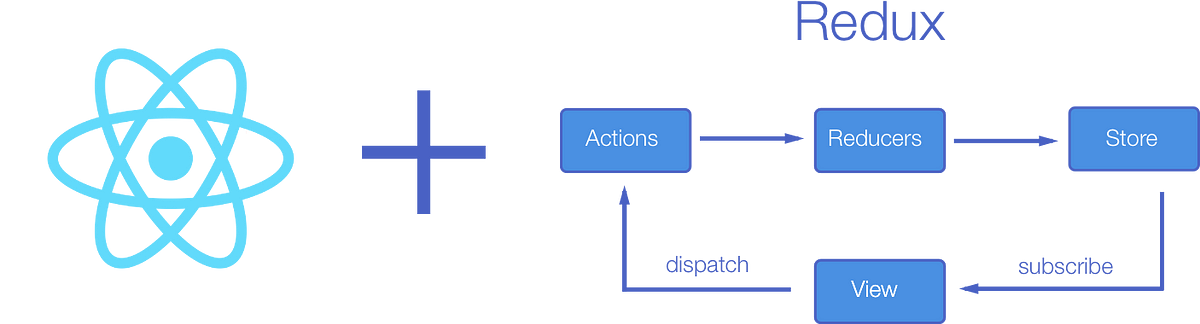
Should You Use Redux? Redux is a valuable tool for organizing your state, but you should also consider whether it’s appropriate for your situation. Don’t use Redux just because someone said you should - take some time to understand the potential benefits and tradeoffs of using it.
Here are some suggestions on when it makes sense to use Redux:
- You have reasonable amounts of data changing over time
- You need a single source of truth for your state
- You find that keeping all your state in a top-level component is no longer sufficient
Review, Research, and Discussion
What are the advantages of storing tokens in “Cookies” vs “Local Storage”
- Cookies are vulnerable to CSRF attacks, but it can be mitigated using sameSite flag and anti-CSRF tokens.
- In cookies you can still make it work, even if you need to use the Authorization: Bearer header or your JWT is larger than 4KB.
- Size constraints: Cookies have a size limitation of 4kb per domain, whereas localstorage size is an order of magnitude larger. For most cases, 4kb is more than enough for storing session tokens, even when using JWTs
- Automatic management: Cookies are automatically saved, sent and removed by the browser. The frontend developer does not have to worry about implementing this part, nor is there any scope of a mistake from the frontend side. This is not true for localstorage.
- Token misuse via XSS attack: An XSS attack happens when “malicious” JavaScript is injected into a website. Some ways in which this code injection can happen are incorrect input / output validation, a rogue third party script being loaded into the site’s frontend code or social engineering.
Explain 3rd party cookies.
Third-party cookies are created by domains that are not the website (or domain) that you are visiting. These are usually used for online-advertising purposes and placed on a website through adding scripts or tags. A third-party cookie is accessible on any website that loads the third-party server’s code.
For example, when you visit a news outlet’s website, the website will create a first-party cookie that is saved to your website. Since this is a news outlet, like many other publisher websites, use ads developed by other websites that create a third-party cookie and save it to your computer.
How do pixel tags work?
A tracking pixel (also called 1x1 pixel or pixel tag) is a graphic with dimensions of 1x1 pixels that is loaded when a user visits a webpage or opens an email. Because it is so small, it can hardly be seen by visitors of a website or email recipients. These tracking pixels are partly or fully designed to be transparent, or camouflaged in the background color of the website so that they don’t stand out to users. Users are usually not supposed to see the tracking pixel. The focus is mainly on the processes that are initiated by downloading the tracking pixel.
Tracking pixels within the source code might look like this:
<img style="“position: absolute;" src="“Tracking">
<img style="“display: none”;" src="“Tracking">
<img src="“Tracking" width="“0”" height="“0”">
How does a tracking pixel work
The website operator or sender of an email adds the tracking pixel using a code in the website’s HTML code or email. This code contains an external link to the pixel server. If a user visits the destination website, the HTML code is processed by the client – usually the user’s browser. The browser follows the link and opens the (invisible) graphic. This is registered and noted in the server’s log files.
In addition, various information about the user is also transmitted using this method. To some extent, combination with JavaScript is necessary in order to collect information about the operating system or browser type.
The following data can be acquired and analyzed with a tracking pixel.
- Operating system used (gives information on the use of mobile devices)
- Type of website or email used, for example on mobile or desktop
- Type of client used, for example a browser or mail program.
- Client’s screen resolution Time the email was read or website was visited
- Activities on the website during a session (when using multiple tracking pixels)
- IP address (gives information on the Internet Service Provider and location)
Document the following Vocabulary Terms
cookies
Cookies are files created by websites you visit. They make your online experience easier by saving browsing information. With cookies, sites can keep you signed in, remember your site preferences, and give you locally relevant content. … First-party cookies are created by the site you visit.
authorization
Authorization is the process of giving someone permission to do or have something. … Thus, authorization is sometimes seen as both the preliminary setting up of permissions by a system administrator and the actual checking of the permission values that have been set up when a user is getting access.
access control is a fundamental component of data security that dictates who’s allowed to access and use company information and resources. Through authentication and authorization, access control policies make sure users are who they say they are and that they have appropriate access to company data.
conditional rendering s a term to describe the ability to render different user interface (UI) markup if a condition is true or false. In React, it allows us to render different elements or components based on a condition. This concept is applied often in the following scenarios: Rendering external data from an API.

Ibarhem Al-omari
Email: ibrahem.omari96@gmail.com